Facebook Twitter Google RSS
Showing posts with label tips n trick. Show all posts

Friday, December 5, 2014

Your Computer Lock with Flashdisk


Predator is a tool that can lock your computer when you're not in front of the PC, even if the PC's operating system you are running.

With this free tool you can make your USB flash drive into a key that you can use to lock and unlock your PC. Thus you can keep your computer from the use of other hands.

How to use this tool very easily, simply by connecting a flash drive you to your PC, then run the tool Predator that is on your PC, and you will be prompted to enter the password as a key to operate the PC that you have. If the tool has been run on your Windows system, when you separate the (Unplug) flash disk from your PC, then you use a computer is locked, even if the Windows OS is operating on the computer. To start the computer back in normal conditions, you simply connect the Flash Disk that you had to use your PC.

With PEDATOR PC security will be maintained with easy, as easy as connecting and separating the USB Flash Disk from the PC!

Download
Corrupt Flashdisk Solutions

If the compiler must have had hooked same thing as flash disks, cuman gmana feels if it turns out the files in the flash disk turns aka damaged corrupted? must have been very frustrating, I've felt how sebalnya fitting turns the files in the flash disk is corrupt. But, the reader need not be broken charcoal charcoal because I will share how to overcome the problem of the corrupted file in the flash disk by using TestDisk.
TestDisk is a free application that can help recover data from corrupt usb flash. Usually damaged Flash Disk will be asked formatted but frequent errors that are not successfully formatted.

With the application of TestDisk can recover lost FAT32 partition.
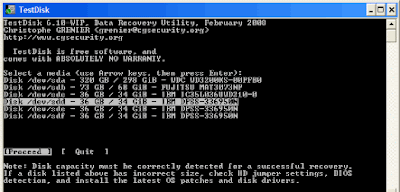
Image


features TestDisk
Repair and restore the partition table is lost / deleted partitions
Rebuilding / Recover FAT32 boot sector
Fixing Table FAT
Rebuilding / Recover NTFS boot sector
Not Deleting files from Fat, NTFS and ext2 filesystem
Copy files from deleted partition
Supported operating systems: DOS Windows 2000, XP, Windows Vista, Windows 7, Linux, MacOS X.
How to Recover Files using TestDisk

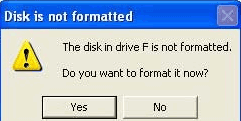
Common symptoms or visible when the flash disk is damaged, Windows Explorer displays the message has not been formatted.

"Drive not formatted, do you want to format now?"


To restore partition or repair the file system, you must run TestDisk with full administrator privileges. In Windows Vista, right-click Testdisk.exe and choose "run as administrator".
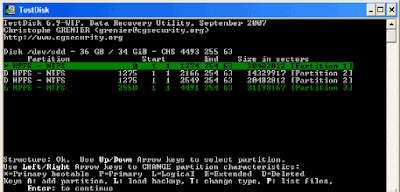
Image


To restore the image of the media partition or repair a filesystem image, run
TestDisk image.dd to create a raw disk image
Image.E01 TestDisk to recover files from EWF image wrap
TestDisk 'image. *' If the image is divided into several files.

If the partition is reformatted in another file system using the steps given below.
Image


Run TestDisk
Select the disk and partition type
select Advanced
select Partitions
select type
Enter a value corresponding to the previous filesystem
select Boot
select RebuildBS
list
If you can see your files, choose Write and Confirm
In the analysis, Choose to rewrite the partition with the correct partition type.

Download TestDisk 
Password : zerotod.blogspot.com